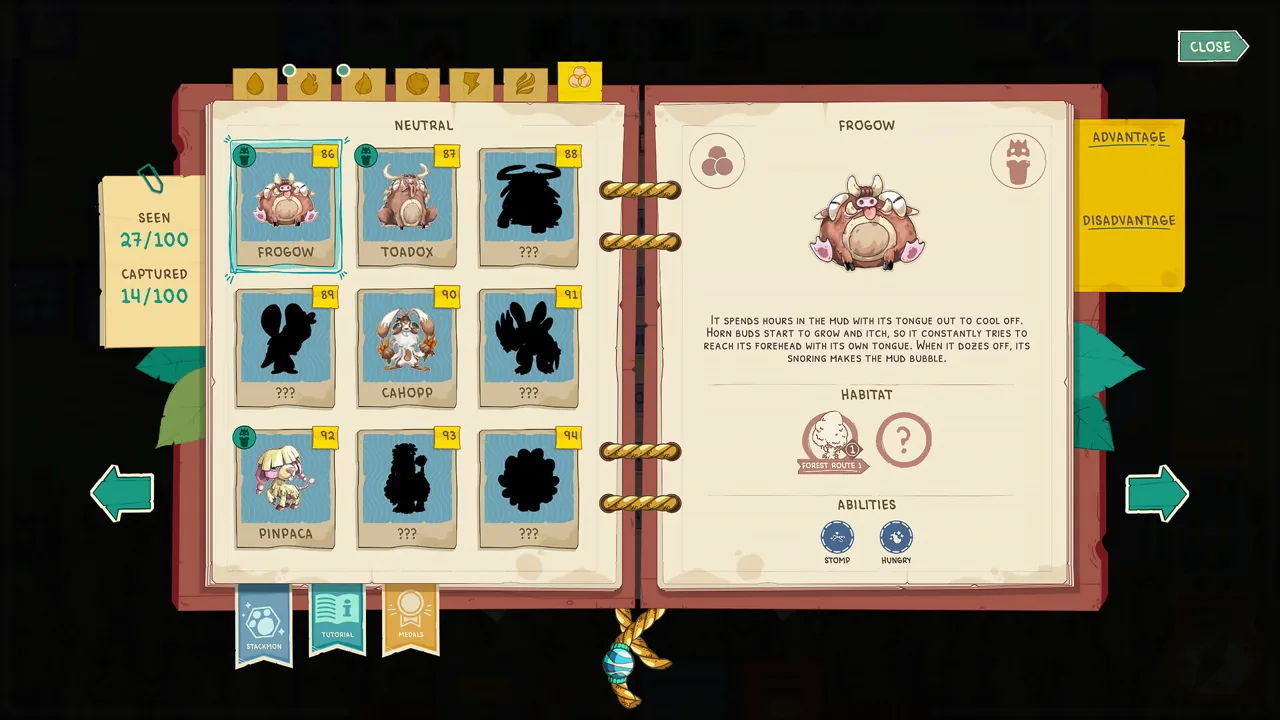
If the backpack keeps filling during expeditions, the useful progression target is your Stackpedia. Current players report that completing more entries unlocks additional backpack space. That is different from the number of identical cards allowed in one stack, which patch 9.0.88 raised from 20 to 30.
Player answer
Quick answer
Fill more Stackpedia entries to unlock backpack space. Capture and identify creatures during normal trips, then check the backpack after each collection milestone. Do not confuse this with the per-stack limit of 30 identical cards.
Open Stackpedia and note the easiest missing entries.
Plan routes that combine those captures with your current resource or mission goal.
Recheck backpack capacity after a collection milestone.
For exact details: Use the live Stackpedia and backpack screens for the exact next threshold; no current public source gives a complete slot-by-slot unlock table.
The Field Guide groups discovered records and silhouettes by type. Use its tabs to check the current live roster. Official Steam store screenshot
Use Stackpedia progress as the upgrade path
Launch players point to Stackpedia completion as the way to gain backpack space. Open the collection before an expedition, choose a small set of missing entries and build the trip around them. This turns capacity progression into the same capture loop you already need for achievements and creature discovery.
Target efficient missing entries first
Start with creatures connected to routes you can already survive. Bring a Stack Totem, leave room for the capture and pair the trip with another need such as Water, Wood, Rope or a mission objective. A route that advances several goals is easier to repeat than a long single-creature hunt.
Separate backpack capacity from stack size
These are two different limits. Backpack capacity is the number of carrying spaces available during travel. The stack limit is how many identical cards can share one pile; patch 9.0.88 increased that limit from 20 to 30. Combining identical cards may reduce clutter, but it does not replace the Stackpedia progression used for more backpack space.
Pack for the route, not for every possibility
Until the next capacity unlock, reserve space for the route objective. Take a capture item, enough recovery for the expected fights and only the recipe inputs you know you will use. Leave low-priority duplicates at Harmony and avoid filling the final slot before the reward or creature you came to collect appears.
Recheck capacity after collection milestones
Public sources do not list every exact Stackpedia threshold, so watch the game after adding several new entries. Open the backpack, note the available spaces and continue from the next easiest missing group instead of assuming one capture should always create one slot.
If backpack placement looks broken
Update first, make an empty space and retry the current placement hint. Patch 9.0.90 added a gamepad hint for placing cards in the Backpack. If the card still will not move, test with mouse input or another ordinary card before selling inventory or changing a save.
Troubleshooting answers
Common questions
How do you get more backpack space in Stackmon?
Players report that filling the Stackpedia unlocks more backpack space. Focus on missing creature entries and recheck the backpack after collection milestones.
Is backpack size the same as stack size?
No. Backpack space controls how much you can carry. Stack size controls how many identical cards can sit in one stack; patch 9.0.88 raised that separate limit from 20 to 30.
What should I carry while unlocking more space?
Keep the capture item, healing and the resources needed for the route. Sell only true surplus after checking missions and recipes so an inventory cleanup does not create a new bottleneck.
Why can I not place a card in the backpack?
First make room and use the current placement hint. Patch 9.0.90 added a gamepad hint to the Backpack; if placement still fails, update before treating it as a progression lock.