Searching for a Stackmon evolution stone? The in-game item is called an Evolve Gem. Use it on a compatible Stackmon you already own, not a wild creature, and let the current card prompt tell you whether that evolution path needs another input.
Player answer
Quick answer
Drag the Evolve Gem over your owned Stackmon and look for a highlighted compatible card. Drop the gem on that card. If no evolution starts, stop and read the current prompt before adding another item.
Capture or otherwise obtain the Stackmon first; the current game no longer accepts an Evolve Gem on a wild target.
Pick up the Evolve Gem and move it across your owned creature cards.
Drop it on a card that highlights, then follow any extra input shown by the live evolution prompt.
For exact details: There is no dependable public compatibility list or complete reactant table for every Stackmon. Use the highlight and the prompt in your current build instead of testing random combinations.
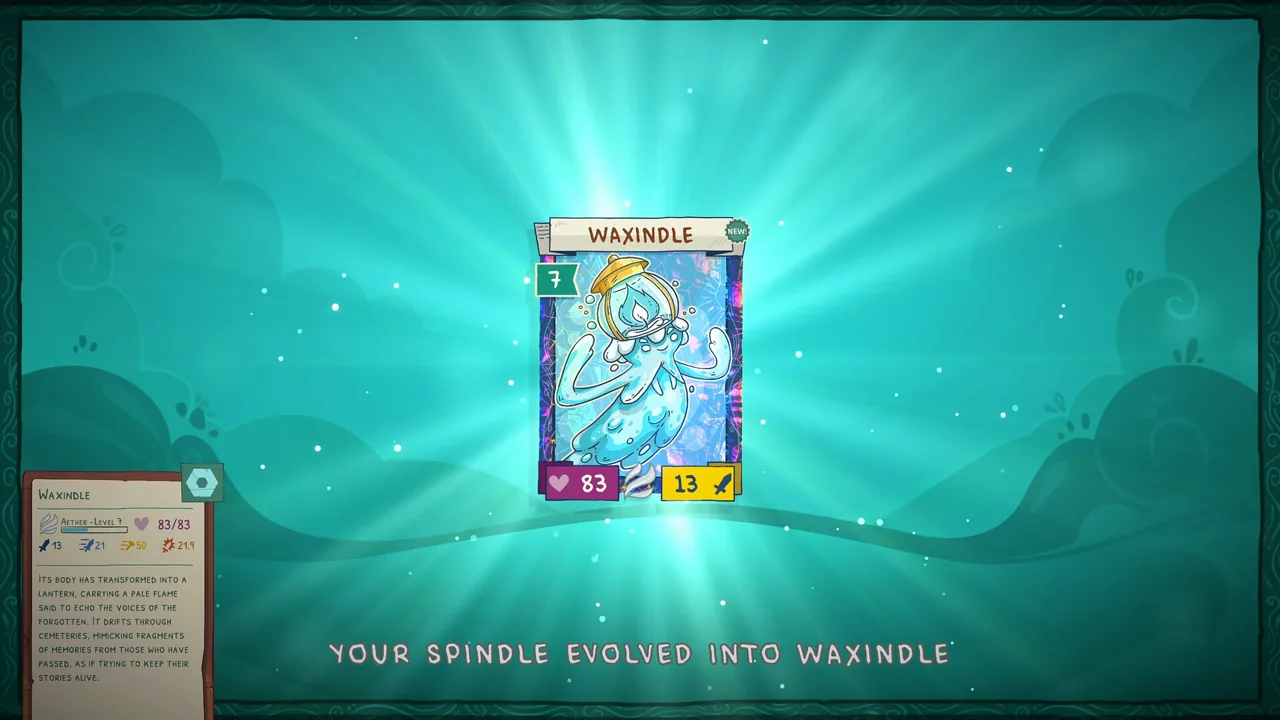
Spindle has evolved into Waxindle on the result screen. Use the live evolution prompt for the required level or item. Official Steam store screenshot
Use the gem on a Stackmon you already own
Start in Harmony or another safe board state where you can clearly see your creature cards. Do not carry the gem into a wild encounter expecting it to work there: the official 9.0.74 patch notes say the ability to stack Evolve Gems with wild Stackmon was fixed. Capture the target first, return to your owned cards and then try the item.
Move the gem across your creature cards
Pick up the Evolve Gem and drag it over the Stackmon you own. Multiple players answering the same Steam question describe compatible cards gaining a highlighted frame. Treat that highlight as the useful on-screen check: it tells you which visible card can accept the item without asking you to guess from an old chart.
Drop it on the highlighted Stackmon
Release the gem directly on the highlighted creature card. Players in the discussion describe an evolution progress bar beginning after the drop. Keep the board clear enough to see the card boundary, and try the precise overlap again if the first drop simply returns the gem to the board.
If the Evolve Gem does nothing
Use a short decision check instead of spending more materials. Confirm the creature is owned, confirm its card highlights, and then read the prompt that appears for that path. A non-highlighting card may be incompatible or not ready. A highlighted card that still waits may require another reactant, according to player reports. Add only the item named by your current prompt; a complete current reactant table is not public.
Wild creature: capture it first.
No highlight: try another owned Stackmon or continue its progression.
Highlight but no evolution: read the live prompt for another input.
Gem snaps back: place it again over the centre of the highlighted card.
Do not confuse the gem with a complete evolution chart
An Evolve Gem is one possible part of the evolution process, not proof that every Stackmon evolves with the same item or at the same level. For example, public material shows Spindle becoming Waxindle, but the result screen alone does not reveal the trigger. Use the broad evolution guide for known chains and use this page when the immediate problem is making the gem interact with a card.
Protect rare creatures before testing a branch
Before evolving a valuable Shiny or a creature with attributes you care about, keep a recoverable save and inspect the card before and after the change. Recent patches have fixed evolution-screen and attribute issues, but they do not publish every branch outcome. The safest choice is to follow the current prompt and avoid experimenting with extra materials that it never asks for.
Troubleshooting answers
Common questions
What is the evolution stone called in Stackmon?
The item is called an Evolve Gem. Players may search for an evolution stone, but guides and patch notes use the Evolve Gem name.
How do you activate an Evolve Gem?
Players report that compatible owned Stackmon highlight while you drag the gem. Drop it on a highlighted card and follow the evolution prompt.
Why will my Evolve Gem not work?
First confirm the creature is already yours and that its card highlights. If it does not, that creature may not accept the gem in its current state. If it highlights but nothing starts, read the prompt for another required input.
Can you use an Evolve Gem on a wild Stackmon?
No. Patch 9.0.74 lists that interaction as fixed, so capture or otherwise obtain the Stackmon before trying the gem.
Does every evolution use an Evolve Gem?
No complete current requirement list is public. Follow the live prompt for the creature you want to evolve rather than assuming one item works for every path.